

White Paper: An Introduction to Paravision Liveness

March 2025
Introduction
As businesses and consumers increasingly turn to online services, ensuring the identity of users becomes more critical than ever. This is especially true in areas such as financial services, digital onboarding, and secure access to sensitive information. Verifying that a user is indeed who they claim to be poses a new set of challenges in the digital world, where face-to-face interaction is no longer possible. While face recognition is a powerful tool for identity verification, it is only one piece of a larger Authentic Identity puzzle. Liveness detection—also called Presentation Attack Detection (PAD) or anti-spoofing—is a necessary counterpart to face matching in remote or unattended applications, where fraudulent attacks such as presenting a photo, video, or mask in the place of a real face can undermine the trust that digital services rely on.
In support of trusted, authentic digital identities, Paravision Liveness 2.0 delivers unparalleled accuracy and usability, significantly improving user experience and reducing friction. It works passively, requiring only a single quality-validated image from a smartphone or webcam, and includes simple and intuitive user feedback to help guide new users while allowing for a broad, comfortable range for user positioning, lighting, and motion.
Paravision Liveness 2.0 represents a major step forward in passive PAD: It protects against a wide array of physical presentation attacks, from simple photos and videos to more sophisticated threats like 3D masks, while also dramatically reducing Failure to Acquire (FTA) rates, even with lower quality webcams. Like all Paravision products, it is developed to excel across diverse demographic groups, and benchmarked accordingly. In combination with Paravision Face Recognition and Deepfake Detection, Paravision Liveness 2.0 advances security while enabling access and inclusion.
In this white paper, we will explore Paravision Liveness 2.0, discussing how it works, the technology behind its high accuracy, and its advantages. We will also address critical considerations, such as the benefit of liveness using 2D/RGB imaging, the role of different camera types, and the distinctions between active and passive liveness detection.
Terminology
Liveness Detection
Technology that assesses whether the subject presenting their face for verification is a live person rather than a static image, mask, or video replay. It typically involves advanced AI-based technology to detect physical and behavioral signs of life. Formally referred to as Presentation Attack Detection and sometimes referred to as anti-spoofing.
Passive Liveness
A form of liveness detection where no explicit action is required from the user. The system determines liveness based on image or video analysis, providing a seamless user experience.
Active Liveness
A liveness detection method requiring the user to perform a specific action, such as blinking, turning their head, or smiling, to confirm they are alive.
BPCER
Bona Fide Presentation Classification Error Rate is a measure of the rate at which live individuals are incorrectly classified as non-live by a liveness detection system. Analogous to False Reject Rate (FRR) for biometric matching.
APCER
Attack Presentation Classification Error Rate is a measure of how often the system incorrectly classifies an attack (such as a photo or mask) as a live individual. Analogous to False Accept Rate (FAR) for biometric matching.
FTA
Failure to Acquire Rate is a measure of how often the system fails to detect or otherwise capture an image from an attempted liveness check.
Considerations for Liveness Detection
Imagery Types: 3D vs. 2D Liveness
Paravision offers liveness technology for a variety of camera types, including both standard 2D RGB (visible light) cameras and more specialized 3D or Near-Infrared (NIR) cameras. While 3D and NIR cameras offer enhanced depth perception and advanced spoof detection capabilities, they are not available in a standard configuration across mobile devices, webcams, and other imaging touchpoints. Because of this limitation, Paravision is highly focused on delivering exceptional liveness detection accuracy and usability with standard 2D RGB cameras, which are far more prevalent and practical in real-world applications.
Advantages of 2D RGB Cameras over 3D/NIR Cameras:
Availability and Cost Efficiency
2D RGB cameras are built into most consumer devices, reducing the need for expensive specialized hardware. In contrast, 3D/NIR cameras add significant cost and complexity to deployment, making them less practical for largescale consumer applications.
User Convenience & Accessibility
Using built-in 2D RGB cameras ensures users don’t need additional equipment for liveness detection, providing a seamless experience in applications like mobile banking or device unlocking. Requiring specialized 3D/NIR cameras can hinder accessibility.
Compatibility with Legacy Systems
Organizations can implement Paravision Liveness using existing camera setups without needing extensive system upgrades, making it easier to deploy compared to 3D/NIR systems, which often require significant changes to infrastructure
Broader Range of Applications
2D RGB cameras offer greater versatility across a wide array of use cases. From consumer electronics and self-service applications to digital services and remote identity verification, 2D cameras enable liveness detection in a broader range of environments. The requirement for 3D or NIR cameras, on the other hand, limits deployment scalability, especially in consumer-facing and cost-sensitive applications.
In summary, while 3D/NIR cameras offer meaningful advantages in certain cases, 2D RGB cameras offer broader compatibility, lower cost, and greater ease of use, making them the preferred option for most liveness detection applications.
Camera Types: Smartphone Selfie Cameras vs. Webcams
While both smartphone selfie cameras and webcams are common 2D RGB camera types used for face recognition and liveness detection, they differ in design and performance, which has significant implications on liveness detection technology. Paravision Liveness 2.0 delivers robust performance across a variety of 2D RGB camera types, including smartphone selfie cameras and webcams, and has been optimized to provide accurate liveness detection on both camera types, even in challenging conditions.
Smartphone Selfie Cameras
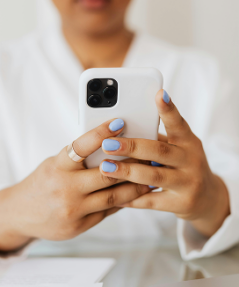
Smartphone cameras typically feature higher resolutions, advanced optics, and technologies like HDR, enabling them to capture detailed images ideal for detecting subtle liveness cues such as skin texture. They also benefit from dedicated image processing hardware, like ISPs and NPUs, which enhance real-time analysis and ensure a seamless user experience. The handheld nature of smartphones further allows users to easily adjust positioning and lighting, improving capture conditions.

Webcams
Webcams, especially those integrated into laptops, often have lower resolution and fewer hardware enhancements compared to smartphone cameras. They are typically positioned farther from the user, introducing challenges like reduced detail capture, additional people in the background, and variable lighting. Paravision Liveness 2.0 has been engineered to mitigate these challenges, leveraging advanced algorithms to extract maximum detail even from lowerresolution inputs. Browser-based capture capabilities ensure consistent performance across web platforms, and real-time guidance helps users optimize their positioning for successful verification.
While smartphones provide an ideal platform for liveness detection due to their superior hardware, Paravision Liveness 2.0 excels on webcams as well, thanks to its cutting-edge AI technology including a rapid and robust quality assessment suite as well as deep learning models specifically designed to handle the unique challenges posed by webcam inputs. This ensures reliable liveness detection for both mobile and desktop users, enabling seamless integration into a range of remote identity applications.
Environmental Conditions
Liveness detection performance can be influenced by several environmental and device-related factors. Paravision Liveness is developed and benchmarked with careful consideration of real-world variability, ensuring high accuracy across a range of conditions.
Impact of Lighting & Device
Variations in lighting, from bright sunlight to dim indoor environments, can affect the quality of captured facial images. Paravision Liveness uses robust deep learning models that perform well across a wide range of conditions and advanced image quality metrics to mitigate these effects, providing real-time feedback to users when image quality is insufficient.
Performance Benchmarks in Real-World Scenarios
Paravision benchmarks its technology using real-world datasets that account for environmental variability, including different lighting setups, camera types, and user behaviors. This extensive testing ensures that the system performs reliably across mobile devices, laptops, and desktops, whether in a controlled office environment or a less predictable outdoor setting.
Liveness Types: Active vs. Passive
While active liveness detection requires the user to perform a specific action, such as blinking or moving their head, Paravision’s passive liveness technology eliminates this step, making the user experience smoother. Passive liveness works in the background, analyzing subtle physiological characteristics to verify a person’s authenticity without interrupting the flow of a transaction or security check.

Active Liveness
Requires the user to perform an action, like blinking or nodding, to confirm they are live. It’s highly secure but can add friction to the user experience.

Semi-Active Liveness
Doesn’t require active participation from the user, but will create an active environmental variation, such as flashing colors or light patterns.

Passive Liveness
Works in the background, analyzing subtle cues like skin texture without any user interaction. It enables security with a seamless, frictionless experience.
Attack Types: Presentation Attacks and Digital Manipulations
Paravision Liveness is certified to protect against a wide range of attacks, including Level 1 and Level 2 presentation attacks. Level 1 attacks involve simple physical presentation methods such as printed photos, image cutouts, or static images displayed on screens, while Level 2 attacks are more sophisticated, involving paper masks, 3D masks made of latex or silicone, or video replays. Paravision’s advanced algorithms ensure accurate detection of these threats by analyzing subtle features that are difficult to fake, such as skin texture and reflectance.
Levels of Presentation Attack Instruments
Per iBeta test standard, in accordance with ISO 30107 Standards

Level 1 Attacks
- Expertise required: none; anyone can perform .
- Equipment required: easily available.
- Presentation attack instruments: a paper printout of the face image, mobile phone display of face photos.

Level 2 Attacks
- Expertise required: moderate skill and practice needed.
- Equipment required: requires planning and practice.
- Presentation attack instruments: paper masks, resin masks, latex masks, silicone masks, and 3D printed masks.
In addition to physical presentation attacks, digital manipulations such as deepfakes are designed to deceive systems with artificially generated or altered images. While these are not technically liveness issues, they can be countered with complementary technologies such as Paravision Deepfake Detection, which is specifically built to identify and mitigate digitally altered or synthetic media. By combining Paravision Liveness detection with Paravision Deepfake Detection, organizations can ensure a comprehensive defense against both physical and digital presentation attacks.
Similarly, other types of fraudulent activities like injection attacks and digital manipulations pose a significant challenge to identity verification systems. Injection attacks involve feeding pre-recorded or fabricated data directly into the verification system, bypassing the camera entirely. These attacks require advanced software protections and are adjacent to the typical scope of liveness detection.
Demographic Performance
Paravision Liveness is built to perform consistently across diverse demographic groups, ensuring fairness and reliability for all users. Our technology has been rigorously tested on datasets representing a wide range of age groups, genders, and skin tones to avoid biases that could compromise accuracy for specific populations. By leveraging extensive benchmarking, proprietary training data, and AI technologies, Paravision Liveness minimizes disparities in detection rates, powering inclusive solutions and services.
Key considerations include:
- Dataset Diversity: Testing (i.e., “benchmark”) datasets include broad and balanced representation across races, genders, and age groups to ensure consistent performance.
- Inclusion in Accuracy: Paravision has conducted detailed demographic analysis to verify that APCER / FAR and BPCER / FRR remain inclusive across different user profiles.
- Commitment to Fairness: Continuous monitoring and improvements are implemented to address potential biases and align with the highest standards of inclusivity.
This focus on demographic performance makes Paravision Liveness not only highly accurate but also trustworthy for global and diverse user bases, solidifying its value in critical identity verification applications. For more details on demographic performance, refer to section 6 for internal benchmark results, which highlights our comprehensive testing and commitment to inclusive outcomes.
Use Cases for Liveness
Paravision Liveness serves a wide range of industries and applications where verifying the authenticity of a user’s identity is essential. Its ability to detect whether the subject is a live person in a frictionless manner makes it ideal for the following use cases:
Financial Services
Banks and financial institutions increasingly rely on remote verification for customer onboarding, loan applications, and fraud prevention. Paravision Liveness helps ensure that a live person, and not a fraudulent actor using a stolen image or video, is accessing the service. This protects against identity theft, account takeovers, and other forms of fraud, safeguarding both the institution and its customers.
Travel and Border Security
In the travel industry, ensuring the identity of passengers is crucial for both security and convenience. Paravision Liveness can be integrated into digital check-ins, visa systems and border applications to verify that the person presenting a passport or travel document is a live, authentic user. It enhances security while providing a seamless, hassle-free experience for travelers, even allowing for contactless check-in or security checkpoints.
Government Programs
Government programs that provide services such as social welfare, healthcare, or voting require robust identity verification to prevent fraud and ensure equitable access. Paravision Liveness can help government agencies verify that the person applying for benefits or accessing sensitive services is who they claim to be, without the need for in-person verification, reducing costs and improving efficiency.
Digital Onboarding
For any organization offering digital onboarding services— whether for a new job, a new bank account, or even signing up for online services—liveness detection is critical. Paravision Liveness helps ensure that the applicant is a real person, preventing bots, photos, or videos from being used to create fraudulent accounts. This boosts security without complicating the onboarding process, maintaining a smooth and user-friendly experience.
Passwordless Authentication
Passwordless authentication has emerged as the future of secure logins, reducing the risk of stolen credentials while eliminating the many levels of frustration passwords entail. Paravision Liveness can be integrated seamlessly into passwordless authentication workflows, ensuring that a live, authorized individual is accessing the system without the need for passwords. This not only enhances security but also provides a seamless user experience, reducing friction for users accessing services.
E-Commerce
In e-commerce, ensuring the identity of buyers is essential for preventing fraud in age-restricted purchases and high-value transactions. Paravision Liveness can enable secure, real-time verification of users during checkout, confirming they are genuine individuals without adding friction to the process. This added layer of security helps ecommerce platforms build trust, reduce fraud, and comply with regulatory requirements for specific products.
How Paravision Liveness Works
1. Face Image (Selfie) Capture
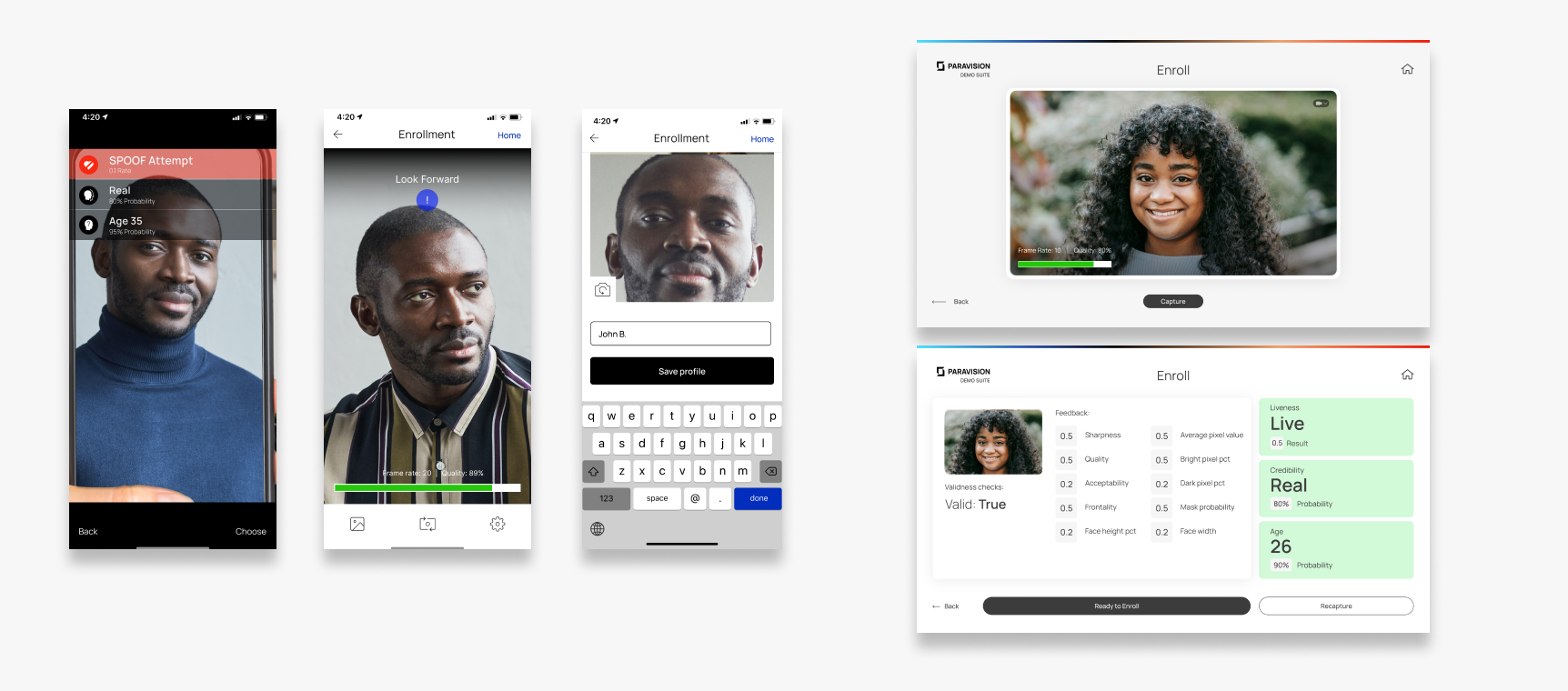
Liveness detection begins with capturing a selfie image, typically using the camera of a smartphone or a webcam. Paravision’s advanced image quality metrics help ensure that the captured image meets the requirements for accurate liveness detection, guiding users in real-time to adjust their positioning, lighting, or camera angle if necessary
2. Liveness Detection
Once the image is captured, Paravision Liveness assesses whether the person is real, using deep learning models optimized for high accuracy across a range of conditions. The system works with singleframe images, evaluating various physiological characteristics, such as skin texture and reflectance to determine whether a face is authentic or a spoof
System Architecture
Paravision Liveness is designed with a flexible, scalable architecture that supports a wide range of deployment environments to accommodate diverse partner needs. The solution can be deployed either as a standalone SDK or through Paravision Processor Docker, allowing for flexible integration into existing infrastructures. Liveness processing occurs server-side, while capture and validity checks can be performed on mobile, desktop, or in-browser as well as server-side.
Integration with Docker and SDK
Paravision Liveness’s backend can be deployed using either a server-side Python or C++ SDK or Docker-based container, providing compatibility with cloud services like Google Cloud Platform, AWS, and Microsoft Azure, as well as private, on-premises servers. The Docker container supports REST and gRPC APIs for efficient communication between partner applications and Paravision Liveness. The Paravision Processor Docker option enables streamlined updates, rapid deployment, and scalability, while the SDK facilitates a more controlled integration.
- Standalone SDK or Docker-based deployment
- Server-side processing with REST and gRPC APIs
- Compatible with AWS, Google Cloud, Azure, and on-premise systems
Frontend SDK for Validity Checks and Image Capture
The optional frontend SDK can be used on mobile, desktop*, and web applications to perform image capture and validity checks before sending data to the backend for liveness detection. This SDK provides near real-time feedback to users to ensure optimal image quality, increasing the reliability and accuracy of liveness detection.
Broad Platform Compatibility
Paravision Liveness capture and validity checks are optimized for a variety of platforms, supporting iOS (Swift), Android (Kotlin), Windows (C++, Python), and Linux (C++, Python)*. For web applications, the Paravision Liveness JavaScript SDK is platform-independent, compatible with leading browsers. Mobile and browser-based reference applications are also available with UI/UX recommendations and sample code to facilitate fast, low-risk implementation.
This versatile architecture makes Paravision Liveness easily deployable in various environments, enhancing security through robust liveness detection capabilities that adapt to diverse technical requirements.
Accuracy Analysis
Impact of Validity Metrics
Paravision Liveness uses validity metrics to ensure that captured images meet a high-quality standard before they are passed to liveness detection. The validity metrics in Paravision Liveness enhance accuracy by rejecting unsuitable images, such as those that are blurry, poorly lit, or improperly positioned. While this filtering process reduces error rates by ensuring only high-quality images are analyzed, it may slightly impact Failure to Acquire (FTA) rates in some benchmarks due to the exclusion of images that fall below our forgiving validity metrics. Below are the primary validity metrics used in Paravision Liveness, with explanations on why each is crucial for accuracy and reliability.
| Validity Metric | Description | Default Threshold |
| Number of Detected Faces | Measures the amount of faces found in a picture. | At least one face must be visible in the image. While there can be multiple faces in the image, there should be only one face within the immediate focus area. |
| Face Size and Position | Ensures the face is well-positioned, neither too close to the image’s edges nor excessively large or small. | Face size should be a minimum of 175 pixels for mobile, 100 for webcam; The face should fill 20%-72% of the image width or height, striking a balance between being too small or too close to the camera; The face must remain centered, with at least 80% of the face visible within the image’s field of view (FOV) to ensure accurate detection. |
| Face Quality and Acceptability | Face Quality and Acceptability assess a combination of face size and visibility of key facial features to determine the suitability of a face for detection and further processing. | The face should have a minimum face quality of 0.5, which is determined by factors like image quality, resolution, and facial occlusions; The face should have a minimum acceptability of 0.15, which is determined by multiple factors like focus and completeness of the face. |
| Frontality Score | Measures the orientation of the face in relation to the camera, requiring the face to be relatively straight-on. | The face should have a minimum frontality score of 70, indicating a face that is well-aligned, avoiding angles or profiles that can obscure features or distort liveness analysis. This score is a composite of face yaw and pitch. |
| Medical Mask Presence | Identifies if a medical mask is present, which can obscure key facial features and interfere with liveness detection. | A face should have a maximum mask probability of 0.5. A probability higher than 0.5 indicates the face may be occluded, which can interfere with liveness detection by hiding key features. |
| Face Illumination Level | Controls for brightness, ensuring the face is neither too dark nor too bright, as extreme lighting can obscure facial features. | Pixel Intensity Range measures the brightness of the face region in grayscale, ranging from 0=black to 255= white
Default Range (30-230): works well in typical lighting conditions, such as indoors with natural or artificial light. Strict Range (40-220): Used for more controlled environments, requiring faces to be even better lit and free from extreme shadows or highlights. Loose Range (0-255): Applies no brightness restrictions, allowing the model to process faces in any lighting condition. |
| Face Sharpness | Assesses image sharpness to prevent blurry images from proceeding, as blurred details can impair accuracy in detecting liveness indicators. | The face should have a minimum sharpness of 0.15. This metric evaluates motion blur or focus issues in the image. A higher score reflects sharper images with clear facial features, critical for accurate liveness detection. |
While ensuring an image meets certain validity metrics is not required to use Paravision Liveness, by adhering to these default thresholds, partners can enhance the accuracy and ensure that only images meeting high validity standards proceed to liveness detection. Meanwhile, Paravision user testing has demonstrated that even with these thresholds enabled, the large majority of users should experience an easy and forgiving capture process.
In our accuracy tables, we present results with and without validity metrics, demonstrating the impact of image quality on overall accuracy. By upholding these rigorous validity standards, Paravision Liveness can deliver consistent and reliable liveness detection in a variety of conditions.
Accuracy Benchmarks
For Paravision Liveness – Software Version 2.0.0
In our accuracy tables, we present results with and without validity metrics, demonstrating the impact of image quality on overall accuracy. By upholding these rigorous validity standards, Paravision Liveness can deliver consistent and reliable liveness detection in a variety of conditions.
Liveness Detection Accuracy (BPCER @ APCER)
Paravision Liveness 2.0 technology achieves breakthrough accuracy as measured by the BPCER@APCER metric. This helps ensure robust protection against even the most sophisticated presentation attacks, such as masks or high-definition image displays.
| Benchmark (Level 1 and Level 2 attacks) | BPCER @ APCER = 0.1 | BPCER @ APCER = 0.01 | BPCER @ APCER = 0.001 |
| Mobile – full dataset | 0.00% | 0.06% | 1.20% |
| Mobile – with validity checks | 0.00% | 0.00% | 0.30% |
| Webcam – full dataset | 0.04% | 1.43% | 8.17% |
| Webcam – with validity checks | 0.00% | 0.19% | 5.02% |
Comparison with Paravision Liveness 1.3
Paravision Liveness 2.0 builds on the success from the first liveness detection product released in early 2024. While Paravision Liveness 1.3 was already performing at industry leading accuracy, passing iBeta’s testing with outstanding results (0% APCER, 0% BPCER, and 0% non-response rate for Level 2), Paravision Liveness 2.0 comes with significant accuracy improvements, with over 93% reduction in error rates across key testing thresholds.
| Mobile | Webcam | |||||
| Model | BPCER @ APCER = 0.1 | BPCER @ APCER = 0.01 | BPCER @ APCER = 0.001 | BPCER @ APCER = 0.1 | BPCER @ APCER = 0.01 | BPCER @ APCER = 0.001 |
| New model 2.0 | 0.00% | 0.00% | 0.30% | 0.00% | 0.19% | 5.02% |
| Old model 1.3 | 0.08% | 3.15% | 14.94% | 7.66% | 41.50% | 71.03% |
| Change | -100.00% | -100.00% | -97.99% | -100.00% | -99.54% | -92.93% |
Comparison with Paravision Liveness 1.3 – Speed
Paravision Liveness 2.0 delivers a boost in processing speed for TensorRT, achieving a more than 3x increase over the previous version. This acceleration enables frictionless liveness detection, enhancing the user experience by reducing wait times and supporting seamless interactions across mobile and web applications. The increased speed is particularly beneficial for high-throughput environments like digital onboarding and payment verification, where rapid response is critical.
| Camera type | Metric | New model 2.0 | Old model 1.3 | Change |
|---|---|---|---|---|
| Mobile (Level 1 & Level 2) | BPCER @ APCER = 0.1 | 0.00% | 0.08% | -100% |
| Mobile (Level 1 & Level 2) | BPCER @ APCER = 0.01 | 0.00% | 3.15% | -100% |
| Mobile (Level 1 & Level 2) | BPCER @ APCER = 0.001 | 0.30% | 14.94% | -97.99% |
| Webcam (Level 1 & Level 2) | BPCER @ APCER = 0.1 | 0.00% | 7.66% | -100% |
| Webcam (Level 1 & Level 2) | BPCER @ APCER = 0.01 | 0.19% | 41.50% | -99.54% |
| Webcam (Level 1 & Level 2) | BPCER @ APCER = 0.001 | 5.02% | 71.03% | -93.93% |
In Conclusion
Paravision Liveness 2.0 is a groundbreaking tool for biometric security, providing industry-leading accuracy, speed, and flexibility for verifying user authenticity in digital interactions. Optimized for standard 2D/RGB cameras and compatible across mobile, desktop and web browser platforms, this next-generation liveness detection technology combines security with convenience, making it ideal for diverse applications—from financial services and government programs to digital onboarding and passwordless authentication.
Through its robust ability to detect advanced presentation attacks and intuitive quality checks and user feedback, Paravision Liveness helps ensure that only genuine users are granted access while minimizing friction. The mobile- and web-native SDKs for frontend capture and cloud-ready backend SDKs and Docker Container enable seamless deployment, integration, and scalability for any environment, further enhancing its adaptability to partner infrastructures.
By continuously benchmarking across demographics, environments, and devices, Paravision demonstrates a commitment to fairness, inclusivity, and real-world impact. Paravision Liveness stands as a trusted choice for organizations prioritizing secure and seamless identity verification, paving the way for safer, more accessible digital experiences.
Contact
For more information or to schedule a demo:
[email protected]